If you've ever worked with NetSuite's case management system, you might have encountered a frustrating issue: duplicate cases appearing out of nowhere. While there are several ways duplicates can creep in, we recently tackled one of the biggest culprits for our team and built a simple User Event script to eliminate it.
The Problem
Our support team uses email-to-case functionality. Clients send emails to our support address, and NetSuite automatically creates a support case. Simple enough.
The trouble started when our team used "Reply All" to respond to cases. Because the original email was sent to our support address, that address remained in the recipient list. When the reply went out, it hit our own support inbox and created a brand new duplicate case.
The result? Cluttered case lists, confused team members, and wasted time sorting through duplicates.
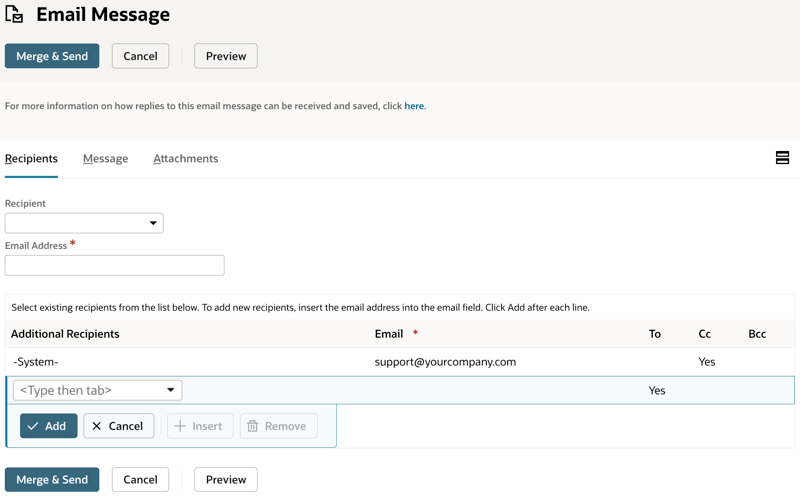
The Solution
Rather than relying on team members to manually remove the support address before sending, we automated it. A User Event script runs whenever someone composes a reply, checks for our support email in the recipients list, and removes it automatically.
Here's the script:
/**
 * @NApiVersion 2.1
 * @NScriptType UserEventScript
 * @NModuleScope SameAccount
 *
 * @author     Contra Systems LLC
 * @description Removes company email addresses from Additional Recipients
 *              when composing a Reply All to prevent sending to ourselves
 */
define(['N/log'], function(log) {

    const EMAILS_TO_REMOVE = [
        'support@yourcompany.com'
    ];

    /**
     * Removes company email addresses from the Additional Recipients sublist
     * when composing a reply to prevent sending to ourselves
     * @param {Object} context
     */
    function beforeLoad(context) {
        if (context.type !== context.UserEventType.CREATE) {
            return;
        }

        try {
            const newRecord = context.newRecord;
            const compose = newRecord.getValue('compose');

            // Only run for Reply All scenarios
            if (compose !== 'REPLY_TO_ALL') {
                return;
            }

            const lineCount = newRecord.getLineCount({ sublistId: 'otherrecipientslist' });

            // Find lines to remove (iterate backwards to avoid index issues)
            for (let i = lineCount - 1; i >= 0; i--) {
                const email = newRecord.getSublistValue({
                    sublistId: 'otherrecipientslist',
                    fieldId: 'email',
                    line: i
                });

                if (email && EMAILS_TO_REMOVE.includes(email.toLowerCase())) {
                    newRecord.removeLine({
                        sublistId: 'otherrecipientslist',
                        line: i
                    });
                    log.debug('Removed Recipient', `Removed ${email} from Additional Recipients`);
                }
            }

        } catch (error) {
            log.error('Error in beforeLoad - Remove Recipients', error);
        }
    }

    return {
        beforeLoad: beforeLoad
    };
});
How It Works
The script uses a few key techniques:
Early exit conditions — We only care about CREATE events (when a new message is being composed) and specifically the Reply All scenario. Everything else passes through untouched.
Backward iteration — When removing items from a list, always iterate backwards. If you go forward and remove index 2, what was index 3 becomes index 2, and you'll skip it. Going backwards avoids this entirely.
Case-insensitive matching — Email addresses can arrive in mixed case. Converting to lowercase before comparison ensures we catch Support@yourcompany.com just as easily as support@yourcompany.com.
Configurable email list — The EMAILS_TO_REMOVE array makes it easy to add additional addresses later without touching the logic.
Deployment
To deploy this script:
- Create a new SuiteScript file in NetSuite's File Cabinet
- Create a Script record with type "User Event"
- Deploy the script to the Message record type
- Set the deployment to execute on "Before Load"
Results
Since deploying this script, we've seen a significant drop in duplicate cases. It wasn't the only source of duplicates, but it was one of the biggest for us. The fix is invisible to the support team—they simply reply as they always have, and the script handles the rest.
Sometimes the best solutions are the ones nobody notices.

Contra Systems
Your trusted NetSuite consulting partner, helping businesses optimize their ERP systems with expert solutions and dedicated support.